
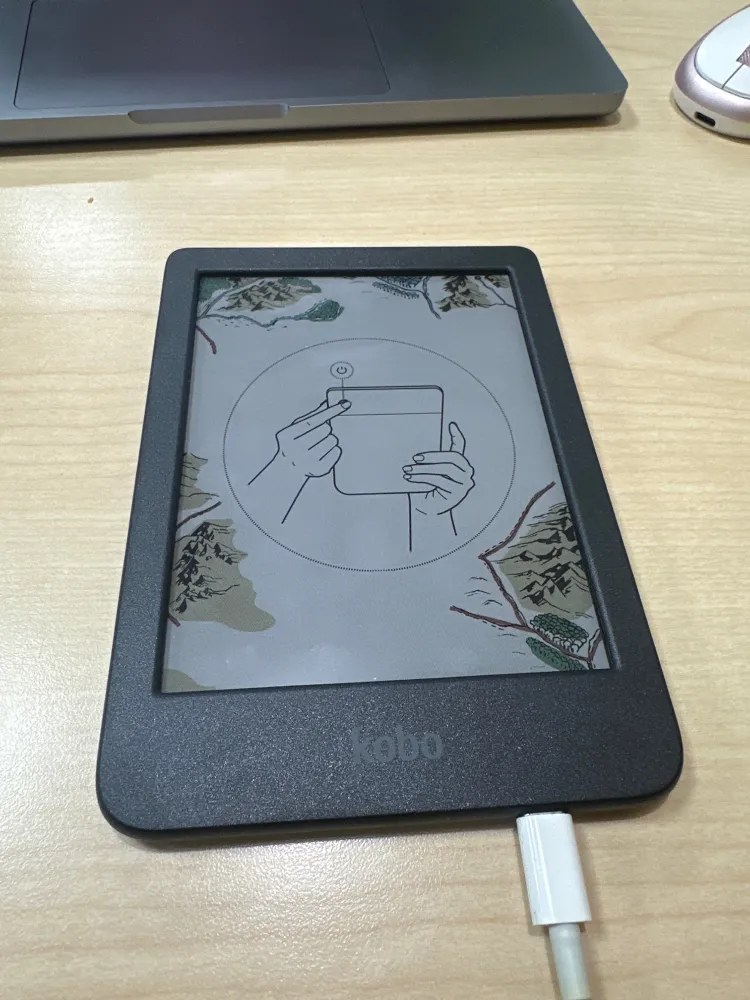
Reading is important to me. Half a year ago, I tried to use a Nook GlowLight 4. The result of that is documented in Do not buy a Nook GlowLight 4. As you can guess by the title of this piece, I had a similar experience today. Since I wrote that piece, Kobo devices became available in Best Buy locations, and someone told me I was wrong about them requiring an account to use1. Their confidence in the face of so much obvious information to the contrary convinced me to try it for myself. (Note: Each of those words is a different link.)
The first warning sign was in the difference between the quick-start guide’s instruction and how the device actually works. It informs you to press and hold the power button to turn it on, but that does not work. You must press and hold briefly for it to power on (it will not turn on until you let go), and it automatically turns on when plugged in2. It then tells you to go online to get started, with no indication in the guide or on-screen that you will be forced to make or sign into an account, or that you can set up the device by connecting it to a computer.
A point in its favor is that the device recognizes a captive portal and allows you to access the browser to get online before registration. Once I was online, I was presented with an account type selection screen with around 30 options. I knew to expect this, despite their insistence that everyone else is wrong, so I went to look at options for bypassing it.
You’re Just Supposed to Know
The first thing I found was an article praising Kobo’s new sideloading mode3 – a way to use the device without an account at all. Of course, you have to know this exists and be comfortable going into hidden directories and editing an INI-formatted file4, and know that you can plug in the device to do this. None of this is presented in a user guide anywhere I could find (and believe me, I spent multiple days looking). Even in the multiple online guides I found, no one explains that the device must be restarted for these config changes to take effect. I couldn’t even find the firmware version to check whether or not I have access to this feature. (And when I did find it, it wasn’t labeled as firmware version, you’re just supposed to know that “software version” really means firmware version.)
A problem many technically minded people have is not being able to understand that the vast majority of people do not know and are not interested in learning how to work with computers beyond a surface level. A setting this buried is effectively not an option at all. When determining the quality or value of a device, the majority’s ability to use it matters more than how well a technically-minded person can use it. I’m glad to see people learn to do more with their devices, but it shouldn’t be from secrets to be discovered like this.
I was working with a terrible internet connection, so I decided to charge the device while finding information. I turned off the device and plugged it into my computer. The screen entered a broken state where it displayed the prompt5 asking if I want it connected to the computer while powered off. There is a black screen that is used when the device is off, but the prompt was displayed on top of that. This concerns me greatly, because it shouldn’t be possible for the “connect to computer” state to interrupt powering down, especially after the point where the screen actually switches to its off display.
Trying to restart the device after it entered this broken state led to a screen with a crossed-out power button and three dots, animating them filling and unfilling. Some kind of loading screen? I now know this is what the device looks like while factory resetting, but at the time I did not, and a crossed-out power button can just as easily mean “I don’t have enough power” as it could mean “don’t turn me off”. The device was stuck in this state for a long time, long enough that I assumed it was broken and tried to force restart it. Then it cleared the screen to a black white of nothing, and refused to do anything.
I went through a series of attempts to bring it back, plugging it in, unplugging it, trying to turn it on while plugged in, trying to turn it on while not plugged in. I don’t remember how many times I tried this, or which state actually brought it back, but somehow it returned to the default screen it had when I pulled it out of the box. This is when I discovered the power-on instructions are wrong. Earlier, I had been a bit impatient and let go of the button quickly – which you’re supposed to do but the instructions tell you to hold it down. I again assumed the device was bricked, because it would not respond.. and then it turned on after I gave up.
Account Registration Bypass
When it went to the screen that had previously recognized it was plugged into a computer, it did not prompt me to connect, so I unplugged it and plugged it in again. (This became a step I had to repeat many times throughout testing the device.) I followed a simple guide6 to bypass the requirement, and finally had a functional device.
Correctly, the device showed no books.. but when sorting by author, suddenly there was like 40 authors, each with a single entry. Tapping on any one of them brought up the “no books” page, but modified to go back to an author list. It was the same for the tab to sort by series, except there was also artwork for all of these supposed book series. There is no way to remove these, and I could not find anyone even acknowledging this problem exists. (The weirdest part to me was how throughout the rest of my testing, these did briefly disappear, but then never stayed away.)
Another problem I have with this device and basically every option that exists similar to it is rampant advertising. They don’t call it advertising, but that’s the purpose it serves7. The home page presents you with mostly options to go to Kobo’s store, rather than access your books ..you know, the entire point of having the device, to read your books? Now, combine that with fake entries in authors and series to clutter things… I just hate it.. no, I despise it.
I started downloading the latest firmware version and tried activating sideloading mode. It worked, eliminating all of the advertising and junk fake book data. I was extremely excited. I tried out the browser and found it worked well enough – though I couldn’t access my ebooks server directly, but what really amazed me was the responsiveness of the screen. There’s a little sketching utility that worked really well, and I could type on the keyboard without too much difficulty (though a lot of error due my unfamiliarity with it).
This eReader Doesn’t Fully Support EPUB eBooks
I opened a book (Martha Wells’ Platform Decay if you’re curious), and immediately ran into.. this ebook reader.. does not.. support.. EPUBs correctly. The epub format is the most popular and accessible ebook format. Amazon briefly tried to dominate with their own specific format, but freely available formats tend to work better long-term, and thankfully that won out… but that makes it even more baffling that this brand new eReader couldn’t recognize the table of contents for a brand new ebook. How do you make an eReader and make it fail to read a table of contents?
Maybe it’s a firmware problem? I have a bunch of other stuff to check before the download finishes on the latest version. (Spoiler: No.) I decided to load a PDF from an Internet Archive scanned book, and that was quite the sad experience. It takes 3-4 seconds to turn a page. (For comparison, The Nook I tried did it in like 1 second.) Worse, I know this isn’t a hardware problem or a flaw with the PDF I chose to test with, but bad software.
After a firmware update8, PDFs take closer to 3 seconds on average to turn a page, and now there’s a Bluetooth indicator in the title bar9. (This is how I learned what a factory reset looks like, because they use a very similar design for applying updates. I’m leaving out details like how often I reset the device, partially cause it was exhausting and I don’t remember, and partially cause this is already too long.)
Third-Party eReader Software
At this point, I knew the device wasn’t really going to be usable for me, so I figured I should try third-party eReader software on it to see how that compares to the stock experience.
- koReader10 loads faster and runs faster while having more options and less artifacting while changing the display, and loads PDFs faster, and pre-loads the next page while a PDF is loaded so that when you go to the next page, it appears instant. While reading, a person doesn’t turn pages very quickly, so this strategy makes it appear to be near-instant loading. A downside to this is that loading happens on the main thread, so the device is unresponsive while loading a page (this is the same on all eReader software I tried).
- Plato11 is similarly better than stock, but is slower and less featureful than koReader. I do prefer its simpler touch zone layout, but koReader is just better in every other way.
The most noticeable difference with these was how much smoother things ran. I wanted to test more with regards to PDF handling (different formats, high-res large images, a long and detail anatomy textbook) and compare the different eReader software options. I also intended to check out how well it could display comics, and try an audiobook since this device with no audio port is supposed to be able to play them.
I don’t remember how many times I opened books or rebooted the device, but it worked stably, until it didn’t. It suddenly factory reset, and displayed the original screen again. When turning it on, it resets again. An infinite loop.
Is Kobo Ashamed of SideloadedMode?
I wrote most of this piece in one night, and then came back to check details, add links, and make sure I didn’t get things wrong in my rush to turn hours of notes into something readable. I wanted to link to Kobo’s release notes and the announcement of sideloading, but I can’t find anything from Kobo about it. There is a forum thread apparently containing the release notes, but this contains no reference to a source. There are many articles praising the decision to add this feature, but none of them reference Kobo – it all comes from forum users. This poorly worded article even calls it an unveiling.. but I can’t find anything except the veil.
The only official reference to the device sideload mode I could find from Kobo is in a 2024 blog post where they say they updated parental controls to block sideloading. I tried contacting them and received no response12. (I do find it funny that in their recent partnership with Storygraph, they explicitly block you from automatically syncing your own books – what they refer to as “sideloaded” books.)
I point this out because it’s part of the whole problem with all of this. There are options to make these devices better, but you just have to know they exist. No official source will tell you about them (except for hinting at it in that one blog post).
Accessibility
I don’t have anything to add about accessibility myself, but I would like to share a video I watched in January or February about Kobo’s accessibility:
- This all started from a bsky thread, which has now been suppressed. I tried to archive it (multiple times in fact), but was unable to due to the constant attacks on preservation of history targeting the Internet Archive. Cool. This vagueposting was my trying to comprehend / expressing frustration over being obviously lied to. It started as a reply chain from this post. I did my best to reconstruct it here.
- I do not have the time to get into it now, but automatically turning on a device when it receives power is a bad idea. Just at a surface level, the battery can be really low and you can have unreliable power, which makes it unlikely you can charge the device without babysitting it to make sure it doesn’t just stay on unpowered. Believe it or not, that situation is still common.
- How to Use Kobo’s New Sideloaded Mode is just a reformatted copy of this forum post. Apparently, enabling this deletes dictionaries from the device, though you can restore them. I did not test this, nor did I think to.. because it makes no sense for this to be affected. The fact that it is is another concerning detail.
- MobileRead wiki: Kobo Configuration Options is very outdated, but contains a lot of hidden settings information, as well as basic instructions for how to modify them.
- You can see what that looks like here (from Kobo’s support site).
- Kobo Offline. Simple only because I have experience with using DB Browser for SQLite, know what a database is, and how to interact with them. This is completely unsuitable as a thing to expect the average person to do. The alternative of setting up credentials with a company similar to Amazon is really bad long-term.
- I thought it would be useful to highlight this conversation on Hacker News, of how Kobo has gradually changed Kobo eReaders to focus on their shop instead of reading books – ostensibly the entire point of buying an eReader.
- Rakuten kobo | Help: Manually Updating your Kobo eReader device Firmware. The instructions are well-presented, but expect a user to be aware of how some platforms handle ZIP files a bit differently and to know how to make a hidden directory appear. This is difficult for the average user. I consider it unacceptable. (As an example, this user failed to understand the instructions even after someone else clarified them.) Do not use third-party download sites for firmware. I say this because I only found outdated firmware and misleading or incorrect information on these. (It’s possible the MobileRead wiki’s Kobo Firmware Releases is an exception to this, but I do not know.)
- What could an eReader possibly want with Bluetooth? Probably file transfer with some obscure protocol. Nope, it’s to play audiobooks over wireless headphones. Despite having no headphone jack and an extremely limited processor, they decided to make audiobooks a function. Maybe that could be fine. I’ll never get to know as I couldn’t try it before the device bricked itself. I do know that they don’t support standard audiobook formats, and question whether or not the USB C port can at least be used for audio… but again, I couldn’t find out more due to the unstable nature of the device.
- koReader11 will be overwritten if you do a factory reset, but may not disappear with firmware upgrades.
- I followed this guide to install both koReader and Plato.
- I was forced to interact with a chatbot instead of being allowed to contact support, which stated they do not publish or make release notes available in any form. Obviously, this could be wrong, but since courts decided companies must be responsible for what an AI support bot says (also see this much worse worded article about a different case), I’ll take it. I’m burnt-out from working on this anyhow.